← all video builds ~/builds $ ~/personal-map $ npm run dev

Your map. Your data. No lock-in.

A personal mapping application built on open-source Leaflet: a thin reader over your own GeoJSON files. Drop in places and a route, and the map draws itself — pins, labels, and an animated route — with an offline canvas grid when there is no network. A deterministic recorder then captures the running app to MP4, so the sample below is exactly what the recipe renders.

Leaflet 1.9your GeoJSONoffline gridfree to unlock
map-app-build — sample output · 6s
● autoplay · muted · seamless loop — the exact file you receive the recipe for 1080×1080 · 30fps
examples

The map, as a GIF.

A share-ready GIF of the personal map build — rounded corners, seamless loop. The pins drop in, the route draws itself, and the whole thing works offline.
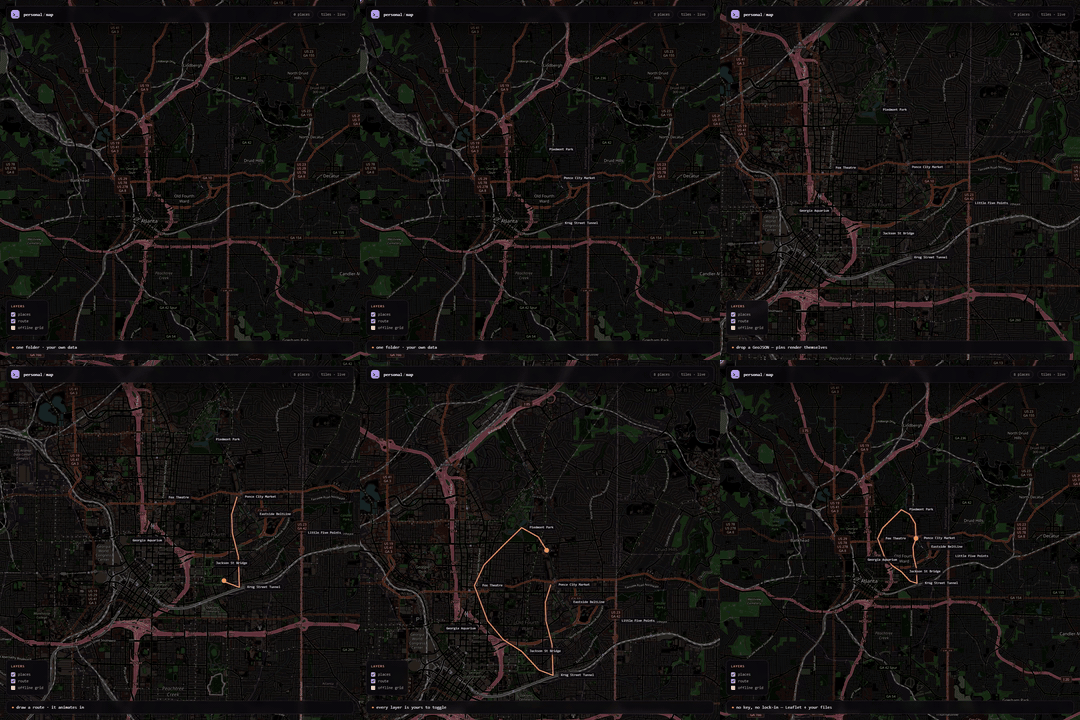
Personal Map build — animated GIF example
map-app-build.gif · rounded · loops forever · 1080×1080 · 30fps
what this build is

A map you actually own.

No subscription, no locked basemap, no export button. One folder of static files reads your data and draws the map — anywhere, forever.

01

Data in, map out

data/places.geojson renders as labelled pins; data/route.geojson becomes an animated route. Edit the files, reload, done.

02

Open-source basemap

OpenStreetMap tiles, CSS-inverted to the brand, over vendored Leaflet (MIT). Swap the tile URL or delete it entirely.

03

Offline grid layer

A canvas L.GridLayer overrides the tile pane, so the map still works with zero network.

04

Deterministic preview

A pure seek(t) hook lets the recorder render the same MP4 every run — no hand screen-captures.

how it works

From two GeoJSON files to a running map.

Plain HTML/CSS/JS — no bundler required. Open it from a static server, or run the Vite dev loop.

01 boot
L.map() mounts on #map; the OSM tile layer is added and CSS-inverted into the obsidian palette.
02 data
Places render as div-icon pins with permanent labels; the route is measured into cumulative lengths so any fraction can be sliced.
03 animate
apply(t) is a pure function of a 0..1 clock — pins stagger in, the route draws, the camera eases. Same t, same frame.
04 record
preview/record.py opens ?preview=1, seeks frame-by-frame, screenshots, and pipes the frames into ffmpeg → sample.mp4.
what's inside

The .md build guide.

You're getting a downloadable .md build file written for AI agents (and humans). It contains the full recipe, the exact dependencies, the run command, and every knob to tune — plus the finished sample video is embedded above so you can see exactly what it produces.

map-app-build.md
the downloadable guide — the map shell, GeoJSON loaders, the pure apply(t), the recorder and every knob (this is the file you buy)
index.html · src/app.js · src/style.css
the app — plain static files, no build step required
data/places.geojson · data/route.geojson
the source of truth — your points and your track
vendor/leaflet/
Leaflet 1.9 vendored locally for offline use
preview/record.py
the deterministic screen recorder (Playwright + ffmpeg)
sample.mp4 · preview.gif · poster.jpg
finished sample output — shown above
output
1080×1080 · 30fps · 6s · H.264 sample video + a running web app
map engine
Leaflet 1.9 (MIT) — vendored, no key
basemap
OpenStreetMap tiles (invert + hue-rotate filter) or a self-drawn offline canvas grid
data format
GeoJSON — Point features for places, LineString for the route
recorder
Python 3.10+, Playwright (Chromium), ffmpeg on PATH
dependencies
none to run the app; Node 18+ only for the optional Vite dev loop
compare & contrast

Chinchilla code build vs. rented map builders.

Most personal maps are somebody else's app with your pins rented inside it — a subscription, a locked basemap, and an export button. This build is the other thing: a folder of static files that reads your own GeoJSON, drawn by open-source Leaflet, and recorded into a sample video by code.

dimension
this build
rented map builders
What you get
The whole source. HTML, JS, CSS, GeoJSON and the recorder — one auditable folder.
A page inside a platform. You configure it and hope the plan keeps the features.
Data ownership
Plain GeoJSON files. Edit them in any editor; they are the source of truth.
Pins live in their database; export limits and formats vary by tier.
Basemap
OpenStreetMap + vendored Leaflet. Swap the URL, or drop to the self-drawn offline grid.
Their tile provider — increasingly API-key gated, watermarked, or metered.
Offline
Works with zero network. A canvas grid layer replaces the tiles.
Needs their servers; a dead connection is a blank map.
Sample video
Deterministic recorder. A pure seek(t) hook renders the same MP4 every run.
You screen-record by hand and re-do it whenever the map changes.
Extensibility
Edit JS/CSS/GeoJSON — add layers, clustering, routing, your own markers.
Whatever the theme options expose; anything else is a feature request.
Cost model
Free to unlock — a short sponsor view releases the recipe, then free forever.
Monthly subscription or per-seat pricing, for as long as the map lives.
Best for
Maps you intend to keep — a personal atlas of places, a trip log, a business locator, or a data-journalism map built on files you control.
Quick, throwaway pin collections you don't mind renting.

They're different tools. A hosted builder is fine for one afternoon of pins. This build is for a map you intend to keep, own, and point at your own data for years.

Get the Personal Map build.

Free download. Unlock the map-app-build.md guide with a short sponsor view — the same recipe that renders the video above. Paste it into any AI agent and it can rebuild, remix, and re-skin the effect for your own content.

downloadable .md for AI agents instant delivery
free no account · unlocked by a sponsor view
Unlock the .md →
27s watch time — scaled to this build's render workload (399 units), capped at 60s